Notion AI Review 2026: Is It Still the Ultimate AI Productivity Tool in 2026?
Introduction
The productivity software space has changed dramatically in the past two years—and AI is now the defining battleground. In this Notion AI Review 2026, we take a deep, unbiased look at whether Notion’s built-in AI is still leading the pack or getting outpaced by faster, more specialized tools.
Since its initial launch, Notion AI has evolved from a simple writing assistant into a multi-functional AI workspace layer. But in 2026, with advanced competitors offering autonomous agents, real-time research, and deep integrations, the real question is: is Notion AI still worth it?
In this review, you’ll learn:
- What’s new in Notion AI features in 2026
- Real pricing breakdowns and value analysis
- Performance strengths and limitations
- How it compares to competitors
- Whether it’s the right tool for your workflow
What Is Notion AI and Where Does It Stand in 2026?
Notion AI is an AI-powered assistant embedded directly into the Notion workspace, designed to help users write, analyze, organize, and automate workflows without leaving their documents or databases.
Launched publicly in 2023, Notion AI has steadily expanded. By early 2026, Notion reports over 40 million users globally, with a growing percentage actively using AI features weekly. According to multiple industry reports (including coverage from major tech publications), Notion’s strategy has shifted from “AI add-on” to “AI-native workspace.”
In 2026, Notion AI sits somewhere between:
- A writing assistant (like ChatGPT)
- A workspace brain (like Coda AI)
- A lightweight agent system
Its biggest advantage? Context awareness—Notion AI works inside your notes, docs, and databases, not in isolation.
Key Notion AI Features in 2026
Notion has rolled out significant upgrades across 2025 and early 2026. Here’s a breakdown of the most important Notion AI features in 2026:
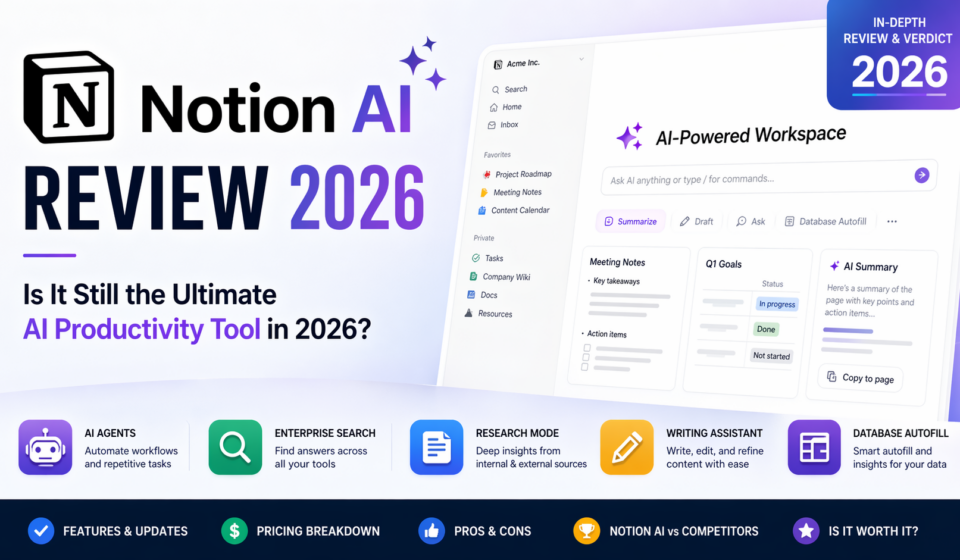
✍️ Writing & Editing Assistant
- Generate blog posts, summaries, emails, and reports
- Rewrite content in different tones
- Translate and simplify text
- Built-in grammar and clarity improvements
What’s new: More consistent tone control and improved long-form generation quality.
🧠 Notion AI Research Mode
One of the biggest updates in late 2025.
- Pulls insights from internal docs + external knowledge
- Generates structured research summaries
- Helps with literature reviews, competitor analysis, and reports
Limitation: Still not fully real-time web-connected like standalone AI tools.
🤖 Notion AI Agents
Notion introduced early forms of AI agents in 2026.
- Automate repetitive workflows
- Generate recurring reports
- Trigger actions based on database changes
Example:
A marketing team can set an agent to:
- Analyze weekly campaign data
- Generate performance summaries
- Suggest next steps
🔍 Enterprise Search
A major feature for teams.
- Search across Notion + connected tools (Google Drive, Slack, etc.)
- AI answers questions based on internal knowledge
- Acts like a company-wide “brain”
This is particularly strong for:
- Large organizations
- Knowledge management systems
📊 Database Autofill & Insights
- Auto-generate database entries
- Summarize rows or entire datasets
- Extract insights from structured data
Useful for:
- CRM systems
- Content calendars
- Product roadmaps
📝 AI Meeting Notes
- Auto-summarize meeting transcripts
- Extract action items
- Generate follow-ups
Still not as advanced as dedicated meeting tools, but deeply integrated into workflows.
🔄 Multi-Model AI Support
As of 2026, Notion AI uses a multi-model backend, dynamically selecting models for:
- Writing
- Reasoning
- Data analysis
This improves performance without exposing model complexity to users.
📱 Mobile AI Capabilities
- Full AI access on mobile apps
- Voice-to-text + AI summarization
- Quick prompts for on-the-go productivity
🔗 Integrations
- Slack
- Google Workspace
- GitHub (limited use cases)
- Zapier and API access
Notion is improving here—but still lags behind more open ecosystems.
Notion AI Pricing and Plans in 2026
Notion AI pricing in 2026 has shifted toward bundled access rather than strict add-ons.
💰 Pricing Breakdown
Free Plan
- Limited AI usage (trial credits)
- Basic workspace access
Plus Plan (~$10/month)
- Expanded AI usage
- Suitable for individuals
Business Plan (~$18–$20/user/month)
- Full AI features
- Collaboration tools
- Limited Enterprise Search
Enterprise Plan (custom pricing)
- Unlimited AI usage (fair-use policy)
- Enterprise Search
- Advanced security + admin controls
📊 Value Analysis
Compared to standalone AI tools:
- Notion AI is cheaper per user if you already use Notion
- But less powerful for pure AI tasks
Key takeaway:
You’re paying for AI + workspace combined, not just raw AI capability.
How to Use Notion AI: Real-World Workflow Examples
📌 Example 1: Content Creation Workflow
- Create a new page
- Prompt: “Write a blog outline on remote work trends 2026”
- Expand sections with AI
- Edit tone and finalize
Time saved: 40–60% compared to manual drafting
📌 Example 2: Product Management
- Store feature requests in a database
- Use AI to summarize user feedback
- Generate product briefs automatically
📌 Example 3: Team Knowledge Base
- Upload internal docs
- Use Enterprise Search to answer questions
- Reduce onboarding time significantly
📌 Example 4: Weekly Reporting Automation
- Connect data sources
- Use AI agents to generate reports
- Share summaries automatically
Performance, Accuracy & Limitations
⚡ Performance
- Fast for short tasks
- Slight lag on complex queries
- Depends on workspace size
🎯 Accuracy
- Strong for:
- Summarization
- Structured writing
- Internal knowledge queries
- Weaker for:
- Real-time data
- Deep technical reasoning
⚠️ Limitations
- Occasional hallucinations (especially in Research Mode)
- Limited external web access
- Not as customizable as developer-focused AI tools
- Agents still relatively basic compared to competitors
Notion AI Pros and Cons
✅ Pros
- Deep integration with workspace
- Excellent for writing and organization
- Strong team collaboration features
- Enterprise Search is highly valuable
- Cost-effective for existing Notion users
❌ Cons
- Not the most powerful AI model
- Limited real-time data access
- AI agents are still evolving
- Can feel slower than standalone AI tools
Notion AI vs Competitors in 2026
| Feature | Notion AI | ChatGPT | Claude | Coda AI | ClickUp AI |
|---|---|---|---|---|---|
| Workspace Integration | ⭐⭐⭐⭐⭐ | ⭐ | ⭐ | ⭐⭐⭐⭐ | ⭐⭐⭐⭐ |
| Writing Quality | ⭐⭐⭐⭐ | ⭐⭐⭐⭐⭐ | ⭐⭐⭐⭐⭐ | ⭐⭐⭐⭐ | ⭐⭐⭐ |
| AI Agents | ⭐⭐⭐ | ⭐⭐⭐⭐ | ⭐⭐⭐ | ⭐⭐⭐⭐ | ⭐⭐⭐⭐ |
| Real-Time Knowledge | ⭐⭐ | ⭐⭐⭐⭐⭐ | ⭐⭐⭐⭐ | ⭐⭐⭐ | ⭐⭐⭐ |
| Collaboration | ⭐⭐⭐⭐⭐ | ⭐⭐ | ⭐⭐ | ⭐⭐⭐⭐ | ⭐⭐⭐⭐ |
| Ease of Use | ⭐⭐⭐⭐⭐ | ⭐⭐⭐⭐ | ⭐⭐⭐⭐ | ⭐⭐⭐⭐ | ⭐⭐⭐⭐ |
Key Takeaways
- ChatGPT / Claude: Better for pure AI tasks
- Coda AI: Strong competitor in structured workflows
- ClickUp AI: Better for task-heavy teams
- Notion AI: Best for all-in-one workspace integration
Who Should (and Shouldn’t) Use Notion AI in 2026?
👍 Best For
- Content creators
- Product managers
- Startup teams
- Knowledge-heavy organizations
👎 Not Ideal For
- Developers needing advanced AI coding tools
- Researchers needing real-time data
- Users wanting maximum AI power without workspace constraints
Future Outlook: What’s Next for Notion AI?
Notion’s roadmap suggests continued investment in:
- More advanced AI agents
- Better real-time data access
- Deeper integrations with external tools
- Improved Research Mode accuracy
If executed well, Notion could evolve into a true “AI operating system for work.”
Final Verdict: Is Notion AI Worth It in 2026?
So, is Notion AI worth it in 2026?
Short answer: Yes—but with context.
Notion AI is no longer trying to be the smartest AI. Instead, it’s becoming the most useful AI inside your workflow.
🏆 Final Score: 8.5/10
Use Notion AI if you want:
- Seamless productivity
- AI embedded into daily work
- Strong team collaboration
Skip it if you need:
- Cutting-edge AI reasoning
- Real-time research dominance
- Full AI customization
🚀 Final Thoughts
In this Notion AI Review 2026, one thing is clear: Notion AI remains a top-tier productivity tool, even if it’s no longer the undisputed AI leader.
Its strength isn’t raw intelligence—it’s context, integration, and usability.
👉 If you already use Notion, enabling AI is an easy win.
👉 If you’re comparing tools, it depends on whether you prioritize workflow integration or AI power.
Ready to test it yourself? Try Notion AI today and see how it fits into your workflow—or explore our full guide to advanced AI productivity tools in 2026.