Fathom AI Review 2026: Is It Still the Best Free Meeting Assistant?
Introduction: Fathom AI in 2026
In 2026, Fathom AI has solidified its position as one of the most recognizable names in the AI meeting assistant space. What began as a simple Zoom note-taking plugin has evolved into a full-fledged meeting intelligence platform that competes head-to-head with enterprise-grade tools.
The rise of AI notetakers over the past three years has been explosive. Tools that once merely transcribed calls now extract insights, automate CRM updates, and even coach sales teams. Against this backdrop, Fathom’s continued dominance is notable—especially given its unusually generous free tier.
Its compatibility with platforms like Zoom, Microsoft Teams, and Google Meet makes it a universal solution for modern hybrid teams.
The real question in 2026 isn’t whether Fathom is good—it’s whether it’s still the best free option in an increasingly crowded market.
Executive Summary
| Category | Verdict |
|---|---|
| Overall Rating (2026) | ⭐⭐⭐⭐☆ (4.6/5) |
| Best For | Individuals, startups, sales teams, async collaboration |
| Biggest Strength | Generous free plan + excellent summaries |
| Biggest Weakness | Limited advanced AI on free tier, privacy trade-offs |
| Starting Price | Free |
| Paid Plans | From $19/month |
Pros
- Truly useful free plan with unlimited recordings
- High-quality AI summaries and highlights
- Seamless integration with Zoom, Teams, and Meet
- Powerful cross-meeting search (“Ask Fathom”)
- Native CRM sync for sales workflows
Cons
- Advanced AI summaries capped on free plan
- Bot presence still required in some scenarios
- Not ideal for highly sensitive or offline meetings
Key Features Analysis (2026)
1. Bot-Free vs. Bot Capture (2026 Update)
One of the biggest criticisms of AI meeting assistants has always been the awkward presence of a “bot” joining calls. In 2026, Fathom has made significant progress here.
- Bot Capture (Legacy Mode):
The traditional approach still exists—Fathom joins as a participant, records, and transcribes. - Bot-Free Recording (Newer Rollout):
Fathom now offers limited bot-less recording for certain environments, particularly:- Local desktop capture
- Select enterprise integrations
This reduces friction in client-facing meetings where participants may feel uncomfortable being recorded by a visible AI agent.
Reality check:
Bot-free functionality isn’t universal yet. For many users, especially on free plans, the bot is still part of the workflow.
2. Ask Fathom: Cross-Meeting Intelligence
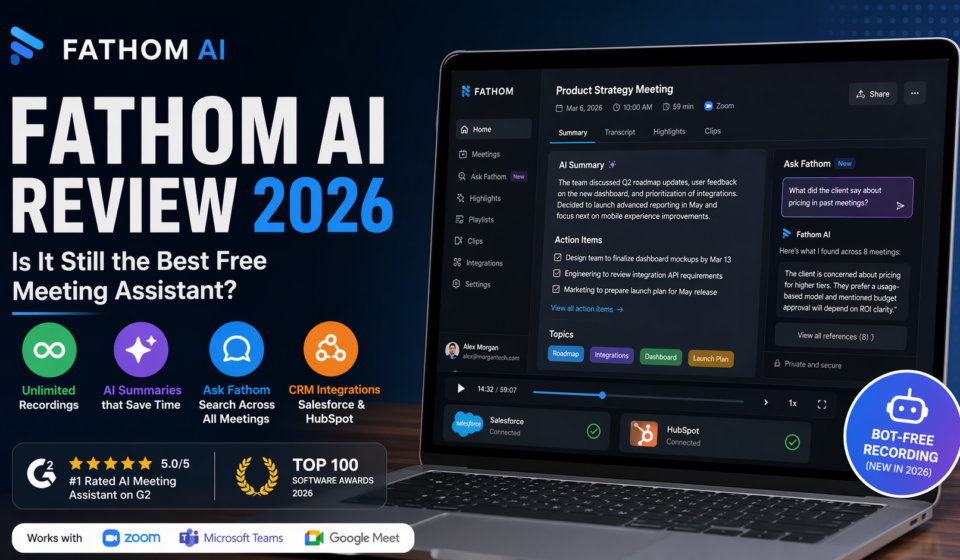
“Ask Fathom” is arguably the most transformative feature introduced in recent updates.
Instead of reviewing individual meetings, users can query their entire meeting history:
- “What did the client say about pricing last quarter?”
- “Summarize all objections from last 10 sales calls”
- “List action items from my team meetings this week”
This turns Fathom into a knowledge engine, not just a recorder.
Key capabilities:
- Cross-meeting semantic search
- Context-aware summaries
- Instant answer generation
For sales teams and founders, this eliminates hours of manual review and creates a searchable memory layer across conversations.
3. Transcription Accuracy (2026 Benchmark)
Fathom’s transcription accuracy now sits in the 92–95% range, depending on conditions.
Where it excels:
- Clear audio environments
- Native English speakers
- Structured conversations
Where it struggles slightly:
- Heavy accents
- Crosstalk or interruptions
- Poor microphone quality
Compared to competitors, Fathom is:
- Slightly behind the very top tier in raw transcription
- But ahead in contextual summarization
The summaries often compensate for minor transcription errors by correctly interpreting intent.
4. CRM Integration: Built for Revenue Teams
Fathom’s integration with CRMs like Salesforce and HubSpot is one of its strongest differentiators.
What it does:
- Auto-sync meeting notes to deal records
- Extract key fields (budget, timeline, objections)
- Generate follow-up emails
- Log activities automatically
For sales teams, this means:
- Less manual data entry
- Better pipeline visibility
- More consistent record-keeping
In 2026, Fathom has moved beyond “note-taking” into revenue intelligence tooling.
Pricing Breakdown (March 2026)
Fathom’s pricing remains one of its biggest advantages.
Free Tier
Still one of the most generous offerings in the market:
- Unlimited meeting recordings
- Basic transcription
- Highlighting and clipping
- 5 advanced AI summaries per month (new limitation)
This cap is the biggest change in 2026. While the free plan remains usable, heavy users will quickly hit the ceiling.
Premium Plan – $19/month
Designed for power users:
- Unlimited AI summaries
- Full access to Ask Fathom
- Faster processing
- Enhanced search and insights
This is the “sweet spot” for freelancers, consultants, and founders.
Team & Business Plans – $15–$25/user/month
Built for organizations:
- Shared meeting libraries
- Team-wide search and analytics
- Sales coaching metrics
- Admin controls
- SOC 2 compliance support
These plans position Fathom as a serious enterprise contender.
Critical Data & Market Standing
Fathom’s market credibility in 2026 is backed by strong third-party validation.
- Ranked #1 AI meeting assistant on G2
- Featured in the Top 100 Software Awards
- Rapid adoption among startups and SMBs
What’s notable is that Fathom has achieved this without abandoning its free-first strategy—a rare move in SaaS.
Comparison: Fathom vs Competitors
Fathom vs Otter.ai (Accuracy)
- Otter.ai wins in raw transcription precision
- Fathom wins in:
- Summarization quality
- Actionable insights
- UX simplicity
Verdict:
Choose Otter for transcripts, Fathom for outcomes.
Fathom vs Fireflies.ai (Integrations)
- Fireflies offers broader integrations across tools
- Fathom focuses on depth over breadth, especially in CRM workflows
Verdict:
Fireflies is better for complex stacks; Fathom is better for focused workflows.
Fathom vs tl;dv (Sales Coaching)
- tl;dv excels in:
- Coaching dashboards
- Sales analytics
- Fathom offers:
- Strong summaries
- CRM syncing
- Simpler onboarding
Verdict:
tl;dv is better for structured sales orgs; Fathom is better for agile teams.
Final Verdict
Who Should Use Fathom AI?
1. Stay on the Free Plan if you:
- Attend a few meetings per week
- Need occasional summaries
- Want a no-cost productivity boost
2. Upgrade to Premium if you:
- Rely heavily on meetings for work
- Want unlimited AI summaries
- Need “Ask Fathom” for knowledge retrieval
3. Choose Team Plans if you:
- Run a sales or customer success team
- Need CRM automation
- Want shared knowledge across the org
Who Should Look Elsewhere?
Fathom may not be ideal if you:
- Work with highly sensitive or confidential discussions
- Need fully bot-free recording in all environments
- Operate primarily in in-person meeting settings
Bottom Line
Fathom AI remains one of the most compelling AI productivity tools in 2026—not because it does everything, but because it does the right things extremely well.
Its combination of:
- A genuinely usable free tier
- High-quality summaries
- Powerful cross-meeting intelligence
…makes it hard to beat.
Final Rating: 4.6/5
It’s no longer just a meeting recorder—it’s a thinking layer for your conversations.